22 April 2012

Employee Equity by Fred Wilson


Just saw this great talk by Fred Wilson, principal of Union Square Ventures, about employee equity.
It's a bit long but if you are building a company try to put an hour aside to watch this.

The video of the entire talk is embedded below, and here's a link to Fred's post about it.


There are useful tips and best practices scattered across the entire talk so it's worth listening to, but if you don't have the time/patience here are the highlights.

The high level concept of the entire talk is that "if anybody goes to the pay window, everybody goes to the pay window". Meaning that everybody in the company should be an integral part of the ride and be compensated accordingly in the case that the entrepreneur and founders get their payday by selling the company, IPO, etc...

At the beginning of the talk (minute 3:37-10:40) Fred explains the basics of dilution, giving an example of a common scenario where a founder brings on a founding team, then some seed investors who also get equity, an employee equity pool, and a VC investment. The example shows how the founder gets diluted as more people get a bite of the pie (as do everybody else along the line).

He then goes on to explain various tax implications of options vs. stock and different vesting plans for employees, founders, and the founding team.

In my opinion, the most important part of the talk starts at minute 32:50 where Fred discusses a technique that he uses for how to calculate how many shares to give a specific employee (it goes till about minute 42:00).

Here's how to determine how much stock to give a specific employee:

First of all you need to put down your own real valuation of your company. This is not an official number or something that a 409A firm comes up with (more on that in the beginning of this video, if you're interested), it's how much you really think your company is worth at that point in time. In his example it's $25M.

Next you need to bucket your employees into 4 buckets and their multipliers:
  • Senior team (CFO, CMO, CPO... executives who report to the CEO): 0.5x - 1x
  • Junior VP level/directors (people who report to the senior team): 0.25x - 0.5x
  • Key hires (engineers, designers,... people who are hard to hire and hard to retain): 0.1x - 0.25x
  • Everybody else: 0.05x - 0.1x
The multiplier ranges are so you can tune it according to your specific market and how competitive/hard to find certain people it is. Geography also affects what multiplier to use.

Now determine the market cash compensation for these people, not what you're gonna pay them, what they would get paid at a competing or big company. In his example it's a CFO who would make $250K annually (you're paying him $175K but he could make $250K on the market).
You then take that number and multiply it by that person's matching multiplier. In this case he used 0.75 which gets to $187,500 which is the dollar value of the equity that you're gonna give the CFO.

All you need now is to see how many shares you have outstanding, and divide. In his example he used 10 million outstanding shares. So you divide the valuation you came up with by the number of outstanding shares to get the price per share (in his example, $25M/10M=$2.5 per share).
Now just divide the equity dollar value that you calculated for that employee by the share price to get how many shares to grant that person. In this example, $187,500 / $2.5 = 75,000 shares (Fred has a calculation error on the board in the class).

Note that the price per share that the employee actually gets will not be the number you used for this calculation, it will be the 409A valuation which is hopefully much lower than the valuation you came up with (you want your 409A valuation to be as low as possible for tax reasons).


At minute 50:15 there is also a part about retention grants. Fred recommends giving retention stock grants 2 years after hiring so that people have unvested stock that will keep them with the company (otherwise they can just leave with their entire stock pool after the 4 year vesting is up).

The formula he recommends for retention grants is one half of what the sign on grant would be for that employee, if the employee was hired today, every 2 years.

So in the CFO example above, he originally got 75,000 shares. Two years later, the company is now worth $50M (twice as much), so his sign on grant would be 37,500. So his retention grant should be 18,750 shares (half of 37,500), vested over 4 years.


That's it, that's the gist of what you need to know about giving your employees stock so that everybody on board is motivated to make the company a success and compensated accordingly.
Share:

26 March 2012

Why Draw Something Works

Drawing from bestofdrawsomething
The latest rage to hit the interwebs, as you all know, is OMGPOP's Draw Something (if you aren't familiar with it you can checkout my review of Draw Something on LightenApp.com).
According to their latest news, only 7 weeks after launching Draw Something was downloaded more than 35 million times and Zynga bought the company for $180 million.

We've seen it time and time again where a company takes an existing concept, that was not necessarily ever a big hit, puts their own twist on it, and the result is "overnight success". Google did it with search and Gmail (for example), Rovio did it with Angry Birds, and the list goes on... The OMGPOP story is far from an overnight success, as my good friend Shahar Nechmad noted in a recent post, but they definitely nailed it with Draw Something.


So what did OMGPOP do in Draw Something that caused this incarnation of pictionary to catch on so fast and turn into the amazing phenomenon that it became?

Here's my analysis.

Asynchronous playing - people love playing mobile games and they love playing with their friends. The problem with playing mobile games with your friends is that you typically need to all play at the same time, which is not very convenient when on a mobile device. You usually want to play on your phone when you have some spare time. In Draw Something the entire gameplay is based on asynchronous turns, so that whenever you want you can launch the app and play a round or two, even if your friend/s aren't currently online. When you finish your turn whatever you did is sent to wait for your friend. So you are playing with real people however you can always launch the app and get immediate satisfaction, even if nobody else is playing at that time. Even though it's asynchronous the game still lets you see what the other side experienced as they were playing, watching you draw. So you get the asynchronous game play without losing much of the real-time effect of playing with another live player.


Simultaneous games with several people - The downside of asynchronous games with real people is that you have to wait a lot between turns, till the other person finishes their turn and sends it back to you. The way OMGPOP solved that problem in Draw Something is by letting you play a lot of simultaneous games with many people.
When you complete a round with one person you don't have to wait around for the person to be online and play their turn, you just jump to another simultaneous game with somebody else. The game allows for enough games in parallel so that typical users will have enough games to play and not get bored waiting around. Since people are playing several rounds at once, each time you launch a round you first see the last drawing you drew for that user. That quickly reminds you where you left off and can continue playing from that spot.


Not being able to quit in the middle - Sometimes you run across players who don't really know how to draw well or are bad guessers. Draw Something is designed in such a way so that you can quit playing with anybody you don't want to play with, but the quitting point is at the end of a round. This subtle product feature keeps users engaged longer with the game than if you could just quit in the middle of a round just because the other user annoyed you ("can't you see that's a golf club???"). When you are in the middle of a round and get annoyed at the other user, you still have to complete the round (watch the user guess your word, watch them draw and try to guess, draw a new word). So effectively you can quit the round once you've finished drawing something. But don't you want to see if the user got your word? After all you just created this masterpiece, you don't want it to just disappear, never to be seen by anyone. Right? Ok, I'll go another round and give them another chance.... Not only does this create more activity within the system, it also give a chance for poor players to keep playing (and hopefully improve).


Limited set of letters to choose from - Not letting users just type in the entire word they are guessing, but forcing them to choose from a limited set of characters has 3 benefits. 1) It limits the possibilities for the curent word ("that looks like a dog but I don't have a 'd', I guess it's cat") which in effect increases the chances that people will guess the word, which makes both sides happier ("If he got the word I guess my drawing was good" and "I'm so smart I managed to guess that word even though it's an awful drawing"). 2) It helps with spelling problems, especially with an international userbase. 3) Finally, limiting the characters creates an opportunity for in-app purchases of bombs to eliminate characters and not lose your winning streak.


Easy random player hookup - Even if you don't know anybody who plays Draw Something you can just get the app, create a game, and find a random partner to play with. Since the game is asynchronous and simultaneous this really helped get the game started even when there weren't a lot of users using it yet (it was easy to seed the game with a small group of initial in-house players who took on the new users coming in).


Playing with actual friends - It's very easy to play Draw Something with people that you actually know, via Facebook Connect. And since the game is asynchronous you can even start playing with friends that don't even have the game yet. This both makes the game fun (it's more fun to play with somebody who you know in real life, vs somebody random) and makes the game viral. If you choose not to connect to Facebook you can still play against people you know via either their user name or email address.


Winning streaks + aligned goals - both players playing a round of Draw Something have the same goal, to guess the word. If I draw a good drawing and you guess it, we both win. Combine that with a winning streak counter and both sides have a mutual goal of keeping up that streak and not letting the other side down. This works exceptionally well when playing against friends you know via Facebook.


Not all the things Draw Something did were so outstanding, but these things are what caused the game to be both fun and viral among friends, which led to its great success.

Here are a couple things they didn't do that well on, and will hopefully improve in their upcoming versions:

The user interface when logging in is not standard and actually quite weird. Instead of asking for your email/username and password they ask for your email and username. I've seen more than a few people put in their email and then type their password in the username field (because it looks like it should be the password field) and what happens is that you now get a new username that is your password. Not cool at all.

They also screwed up the Facebook integration when you choose to sign in with a user name instead of using Facebook Connect. If you use a username you can't then connect to Facebook and play against your Facebook friends. That's both less fun and less viral, both sides lose.


In their next version of Draw Something they will let people share their drawings easily on Facebook and Twitter (among other things they'll be adding). This will create more engagement around the game among friends and increase their virality.

I can't wait to see what other product improvements they'll introduce that will make Draw Something an even bigger success....
Share:

28 February 2012

GrrReader


Google recently moved the Google Reader link into the "More" section of their top navigation bar (you know, that black toolbar that they added to all of their sites when they launched Google Plus).

For those of us who use Google Reader regularly, it's quite an annoyance. Not only the fact that it's now harder to access Google Reader, but the fact that Google can change whatever they want in these tools that we use daily, and we pretty much have nothing to do about it.

So I took the opportunity to create a Chrome extension that adds it back to where it belongs, on the navigation bar itself.
The extension was pretty simple to write and gave me a chance to brush up a bit on my Javascript skills (especially JQuery stuff).

If you're interested, you can find the Chrome extension for download from the Chrome Web Store (it's free obviously).

Comments are welcome...

Share:

15 January 2012

Discovering Apps

I recently started an additional site about app discovery: LightenApp.

As you can probably tell by its name, LightenApp is focused entirely on apps, mainly iPhone apps.

The format is simple: short app reviews added daily.

If you want to discover new apps and get tips and recommendations, just subscribe to LightenApp on any one of these channels:
Like it on Facebook:

Follow on Twitter:


Follow on Google+:


Get the RSS feed:


If you know any good app that you think should be reviewed, let me know.

Share:

06 December 2011

Designing a Logo

We recently changed the name of our company and one of the implications was that we needed to create a new logo for the company.
The name of the company is iglloo (igloo.com was taken, big surprise, but we managed to grab iglloo.com) and when we chose that name I immediately envisioned us having some kind of cute logo, although nothing specific came to mind.
For some reason, we thought it would be pretty easy to create the imagery that goes along with the values what we want our brand to represent (in a nutshell we build apps, primarily for iPhones and iPads), but we quickly learned that creating something "real" out of our vague thoughts, was not an easy task.

We tried a few concepts but the designs that we got were too literal. We kept getting images of igloos.
Things like this:

Which is cute, but not more than that. We were looking for something sophisticated, simple, and fun.
I had envisioned a simple textual logo, with an igloo incorporated somehow as part of that textual logo.

So we decided to open a contest on 99designs
If you aren't familiar with 99designs, it lets you setup a contest for any graphic work you need. For example, you can create a contest for designing a web page and offer a $300 reward to whomever designs the best page for you.
Lots of designers hang around 99designs looking for projects to work on and they may see your project and submit a design, hoping it will win the contest and they'll get paid.

Similar to the X Prize (and the original Orteig Prize which Charles Lindbergh won in 1927 for flying non-stop from New York City to Paris), the idea is that the sum of all the effort put in to the competition by the participants is greater than the value of the prize.

Essentially you get tons of people working for you for free and one of them gets overpaid a bit for their effort.

Sounds like a great concept, especially for things like graphic design.
I heard from a few people about different results on 99designs, some were really happy and some didn't like the quality of the work they got there. So we decided to go with the cheapest option there ($299) and give it a try.

Within a week we got 38 designers who submitted about 140 design concepts for our logo.
Some were WAY off and a few were quite close to the concept we had imagined and tried to describe to the designers, but none of them really stood out. We were basically looking for a stroke of genius.

Here are a few of the designs that were kinda of the concept we were looking for (some after refinement based on our comments to the designers):


In our opinion, none of them were really spectacular/genius enough and we were pretty disappointed with the results.

At that point we pretty much gave up on the contest, didn't award a winner, and went on with our day to day business (still using the old brand). The rules at 99designs are that if you don't pick a winner you don't have to pay. We were definitely willing to pay full price for the design, if there was something that we liked.
I must say, the support team at 99designs did a great job. They were very accommodating, they offered to extend our contest longer because we hadn't decided on a winner yet (contests are typically for 1 week) but we still didn't get good enough results.

At that point I even tried to create the logo myself and came up with this idea:


I actually really liked the concept (I guess I'm just in love with my own ideas) but the problem was that it doesn't scale. At small sizes that little igloo image is totally not clear.

After about 2 months the logo issue came up again and I went back to 99designs to see the old submissions, maybe looking at them again would give a different perspective. Still nothing spectacular.

Since 99designs offer a refund if you don't pick a winner, I sent them an email and asked how I get the refund. They replied that they can only refund within 60 days and that more than that had passed.

They did offer to reopen our contest and basically start over. So we reopened the contest, again for 1 week.
This time we got WAY fewer submissions. I'm not really sure why (I asked their support and they didn't have any good answers). They also offered to give us their PowerPack for free which basically gets you better listings in their directory along with a few other tweaks so it stands out (usually $85).
The PowerPack didn't make any difference, we just got a few random submissions, nothing even close.

Then while looking at all the different submissions I suddenly ran across this design from the original contest:

I never really noticed it because it "wasn't what we were looking for", we were looking for some kind of genius twist as part of the textual logo.
But this was interesting.
We showed it to a few people around the office and everybody pretty much liked it.

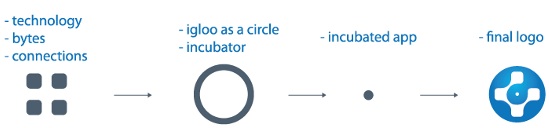
I asked the designer for the meaning of the icon and this is what he sent in reply:
The meaning of the icon according to the designer


Ok, I can live with that.

We then went back and forth playing around with different fonts and stylings, these were among them:

At this point I was just exchanging emails with the designer, going back and forth about different things like the dot above the i, what L's to use, etc... According to 99designs, during the handoff process you can ask for some changes but the designers aren't obligated to do anything. Beehive, the designer who created this logo, was very responsive and helpful. 

After about a day of mixing and matching different elements from different fonts (and trying to keep it from looking like a Frankenstein-ish mess) we finally came up with the final design!

It wasn't what we had originally envisioned in terms of the concept, but it does the job.


And without further ado, here is the official new logo for iglloo:


So do I recommend using 99designs?
To an extent. While looking around there at different projects (I was looking to target designers who created things I like) I saw some pretty good designs.
My feeling is that it's kind of a crapshoot, with relatively good odds.
You may be able to get something really good for not a lot of money but you may leave disappointed.

If you can afford $299 then I would give it a try.
I think logos are particularly difficult to design (the story behind the Conduit logo is quite long too) but if you are looking to design a website you'll probably be able to get good results (although 99designs may be a bit more expensive than just buying a template and customizing it a bit).


Share:

06 November 2011

Twylah - Your Trending Tweets

One of the annoying things about Twitter is that things that you tweet just vanish into the ongoing flow of tweets and disappear forever, never to be seen again by a human being (and Twitter's horrible search engine makes that problem even worse).

I recently ran across a great service that addresses this problem - Twylah.
Twylah analyzes the content that you put on Twitter and automatically generates a site for you which gives your readers a beautiful summary of who you are and what you tweet about.
That page is also optimized for SEO which is a great way for you to drive new traffic back to your content.

So basically, instead of sending people to your boring old Twitter page (which may be filled at the moment with irrelevant tweets because you just happen to be in an ongoing conversation with somebody on Twitter about the latest episode of Beavis and Butthead), you send people to your Twylah page.

That page will show them your personal trending topics and what you are all about.
My Twylah page, for example, currently shows that I tweet about Twitter, iPhone, Apple, Games, and Nike (I recently ran in a Nike run so I've been tweeting about it).

Look at the difference between a regular Twitter page to the Twylah page generated from it:


It's much easier to understand what kind of stuff you tweet about and it looks much better.

I assume Twylah is mainly targeting brands to use this but I see no reason why any individual who is on Twitter wouldn't want to use it.

Check out my Twylah page and you can request a beta invite to get your own.

Share:

25 May 2011

Leaving Conduit


After nearly seven amazing years at Conduit, I have decided to leave the company and pursue other ventures.

This journey started in a room with a small group of all engineers that quickly grew to an outstanding company with over a quarter of a billion (that's right, with a b) of monthly users and a network of hundreds of thousands of publishers. A dream come true for anybody trying to create something online.

Screenshot of an early version of the Conduit homepage
One of the first versions of the Conduit homepage


Over the years I've had the privilege of being involved with many different aspects of the company at different stages: from hands on technical roles, to dealing with our very first customers and users, marketing to the long tail, managing support, product definitions, meeting new prospective publishers, leading product, and the list goes on and on.

This experience has been life changing and gave me the rare opportunity to accompany a company from it's inception, throughout the different stages, the ups and downs, up to a huge success story with hundreds of millions of users and a multi million dollar revenue stream.

I would like to thank all the great people who I've worked with over the years at Conduit and am sure that they will continue to make this company a true game changer.


What now you ask?
(ok, maybe you didn't ask but I'll tell you anyway)
Over the past few years, we've all seen the explosion in the mobile web space. Instead of saying "here's an idea for a startup" people now say "here's an idea for an app" (I even unknowingly tweeted this a few months ago http://bit.ly/l8I6Jm). With the easily accessible platforms and infrastructures we currently have, I believe there is a lot of potential for solving problem with the mobile Internet, and that's what I plan on doing.

I've partnered with Shai Wolkomir, a serial entrepreneur but most importantly an old friend, and together we plan to change the world. Or at least have fun trying to do so.
We've assembled a small but very capable team that will give us the ability to try out our ideas and quickly see what works, what needs refining, and what should be thrown out.

The first product to hatch out of our nest is Props which is a way for people to give recognition to people for things they are good at and get the respect they deserve.

So far it's getting a lot of great responses from the people who saw it at TechCrunch Disrupt and we have a lot of plans for it.

So without any further ado: go install it and let me know what you think :)

Cheers,
Guy
Share:

06 April 2011

Techonomy3 - The Rundown


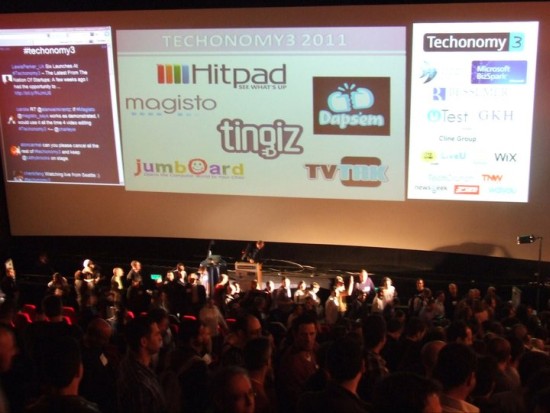
(Photo by Yaniv Feldman - Newsgeek)

This is a repost of an article that I originally wrote for Technorati and was published there.

The startup scene in Israel is booming, and a(nother) testament to that is the Techonomy3 conference, which just wrapped up not long ago.
The format is simple: 6 startups presented to about 400 attendees in the room (and probably a few thousand viewing via the live video stream from around the world).
A panel of respected, well-known judges gave their comments after each presentation, and the audience voted on the winner, American Idol style.

America (well, Israel actually), here are your top 6:
  • Hitpad - an iPad app that automatically gives you highlights of what's going on today by analyzing different online sources and giving you trending topics with drill downs of topics you're interested in. Very cool.
  • Dapsem - an iPhone app to give your friends virtual fist bumps as a sign of appreciation. The concept of giving recognition to people you know is great and has huge potential.
    From what I've seen, Props are the ones to keep your eyes on in that space.
  • Magisto - a web app (remember those? :) that automatically detects interesting content in your videos for creating professional looking edits of your videos. Like Animoto but with zero effort.
  • Tingiz - a platform for creating mobile microsites for products. Manufacturers of physical products can create a mobile microsite for their products and connect them via a QR code. The product microsites will show things like product videos, information, Facebook page, etc...
  • Jumboard - a large plastic PC keyboard with big red, yellow, blue, and green buttons that let little kids easily interact with Flash apps on Jumboard.com. This gives young kids an interface they can easily use to start interacting with games/applications and parents get feedback on the progress of their kids. Kinda like a modern incarnation of the Comfy keyboard.
  • TVtak - an iPhone app for easily getting information about TV shows. All you do is take a picture of your TV while watching a show and TVtak will recognize what you are watching and give you information about that show (and let you share it with your friends). Very much like Shazam does for music.
Based on the reactions of the crowd and the live Twitter board (which was on fire during the event), Techonomy was a huge success for everybody involved.

And without any further ado... the winner of Techonomy 3 is.....
Magisto!

Congrats to the winners and to the organizers of this conference, they put on a great show.
And to the losers: "it's an honor just being nominated", or in this case, just being on stage.
Share: